
Book costs straight from the invoice
Your AI agent books invoices and orders on the right budget line of your Path, as planned, ordered or invoiced. PathHub calculates actual costs and commitments from the bookings itself, nobody has to update totals.
Works with Claude, ChatGPT, Claude Code, Cursor, VS Code and any MCP client with sign-in.
Booked. External consultancy: €3,600 of €12,000 used.
Example flow, simplified
How your agent works
You say in plain language what should happen. Your agent does the rest with the PathHub tools.
Hand over the document
Put an invoice, an order or a list from accounting into the chat.
Find the line
The agent reads the Path's budget and picks the matching line.
Book
It books amount, date and description. PathHub updates actuals and commitments right away.
The result in PathHub
The entry lands right on the budget line: billed as actual, ordered as committed.
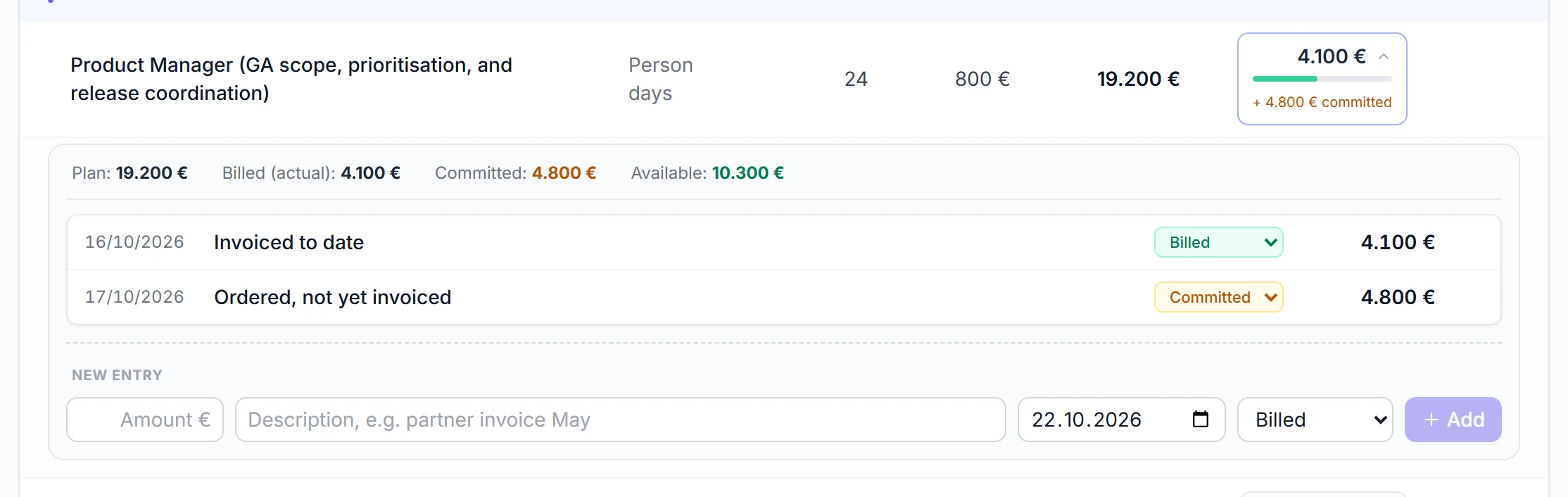
Real view from a sample Path
Best practices
These habits make the results reliable.
Say what kind of booking
An order as “ordered”, an invoice as “invoiced”. Then PathHub shows commitments and actuals separately and correctly.
Include the invoice number
Number and date in the description make every booking easy to find later.
Name the line when unclear
If an invoice fits several lines, name the right one or have the options shown.
Ask for the remaining budget
“How much is left per line?” is a good question before every larger order.
Example prompts to copy
Adjust the Path name, paste into Claude, ChatGPT or your agent, done.
“Book this invoice on the Path Office move, line External consultancy: [paste invoice]. Status invoiced, invoice number in the description.”
“We ordered furniture for €18,400 today. Book it as ordered on the matching line in the Path Office move.”
“For the Path ERP rollout, show me per budget line: planned, ordered, invoiced and what is still free.”
What PathHub makes sure of
Your agent works under the same rules as the app.
PathHub does the maths
PathHub derives actuals and commitments from the bookings. The agent never sets totals by hand.
Your permissions, no more
The agent only sees the workspace you grant at sign-in and can do at most what you can. With read access it changes nothing.
Traceable
Changes show up in the Path as if made by hand and trigger the same webhooks. Every call is logged.
Frequently asked questions
Does the agent calculate the totals?
No. It only creates the booking. PathHub calculates actual costs and commitments from all bookings, just like in the app.
Can I correct a wrong booking?
Yes. Bookings can be changed or deleted, by you in the app or by the agent.
What if the right budget line does not exist yet?
With edit rights the agent can create a new line. Best tell it whether it may.
More jobs for your agent
Try it with your own Path.
Sign up for free, connect PathHub in your AI assistant and get started. Already on the free plan.