
Capture risks while they are fresh
Your AI agent moves risks from meetings, minutes or documents straight into your Path's risk register: as a clear if-then description, with an estimated impact and a countermeasure. It updates existing risks instead of creating duplicates.
Works with Claude, ChatGPT, Claude Code, Cursor, VS Code and any MCP client with sign-in.
2 new risks added, 1 existing one updated with a new countermeasure.
Example flow, simplified
How your agent works
You say in plain language what should happen. Your agent does the rest with the PathHub tools.
Hand over the source
Put minutes, an email thread or your meeting notes into the chat.
Compare with the register
The agent reads the existing risks and sees what is new and what has changed.
Add and assess
Add new risks with impact and countermeasure, update existing ones.
The result in PathHub
The risk appears on the Risks tab, with impact, description and mitigation.
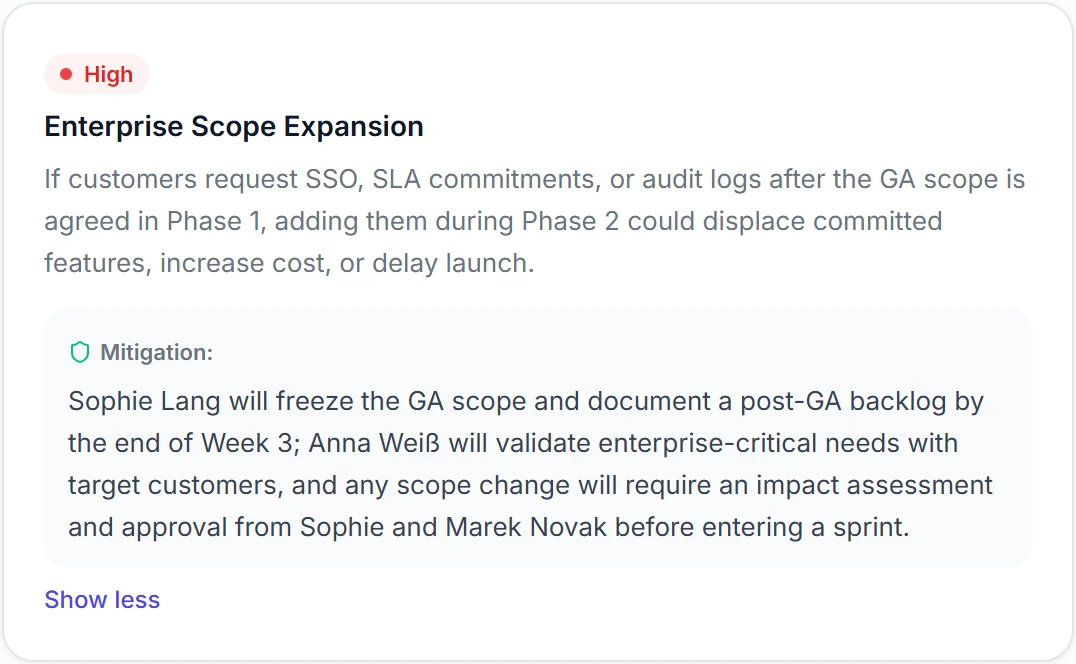
Real view from a sample Path
Best practices
These habits make the results reliable.
Phrase it as if-then
“If the data migration is not ready by week 20, go-live slips.” That keeps a risk testable.
Countermeasure with owner and date
A measure without an owner rarely happens. Have both captured right away.
Check existing ones first
Ask the agent to read the register first. That way you get updates instead of duplicates.
Scan regularly
The built-in risk scan searches the whole Path for gaps. Good before every steering committee.
Example prompts to copy
Adjust the Path name, paste into Claude, ChatGPT or your agent, done.
“Here are the steering committee minutes: [paste text]. Add new risks to the ERP rollout register, update existing ones and do not create duplicates.”
“Check the Path Office move for risks missing from the register and suggest them with impact and countermeasure.”
“Which risks in the Path CRM rollout have high impact and no countermeasure with an owner yet?”
What PathHub makes sure of
Your agent works under the same rules as the app.
You keep the assessment
The agent suggests the impact, you can change it any time in the Path.
Your permissions, no more
The agent only sees the workspace you grant at sign-in and can do at most what you can. With read access it changes nothing.
Traceable
Changes show up in the Path as if made by hand and trigger the same webhooks. Every call is logged.
Frequently asked questions
Does the agent assess the risks itself?
It suggests an impact from low to high and phrases a countermeasure. You can change both in the Path at any time.
How do I avoid duplicates?
Have the agent read the existing register first. Then it updates existing risks instead of creating new ones.
Is there an automatic risk check?
Yes. The built-in risk scan checks the whole Path. Your agent can start it and go through the result with you.
More jobs for your agent
Try it with your own Path.
Sign up for free, connect PathHub in your AI assistant and get started. Already on the free plan.