
Check compliance before it gets tight
Your AI agent finds open obligations in your Paths, maintains their status and documents evidence as a link or note. When the country, industry or description of an initiative changes, it re-runs the check, and missing obligations from the PathHub library are added with their lead time.
Works with Claude, ChatGPT, Claude Code, Cursor, VS Code and any MCP client with sign-in.
DPA done and documented. Open: 2 obligations, the next one is due in week 6.
Example flow, simplified
How your agent works
You say in plain language what should happen. Your agent does the rest with the PathHub tools.
Read obligations
The agent reads the compliance items of one or several Paths with status and lead time.
Maintain status
Open, in progress, done or not applicable, as it says in the conversation or your documents.
File evidence
Document the proof as a link to the document or as a note right on the obligation.
The result in PathHub
Status and evidence sit right on the obligation in the Path's Compliance tab.
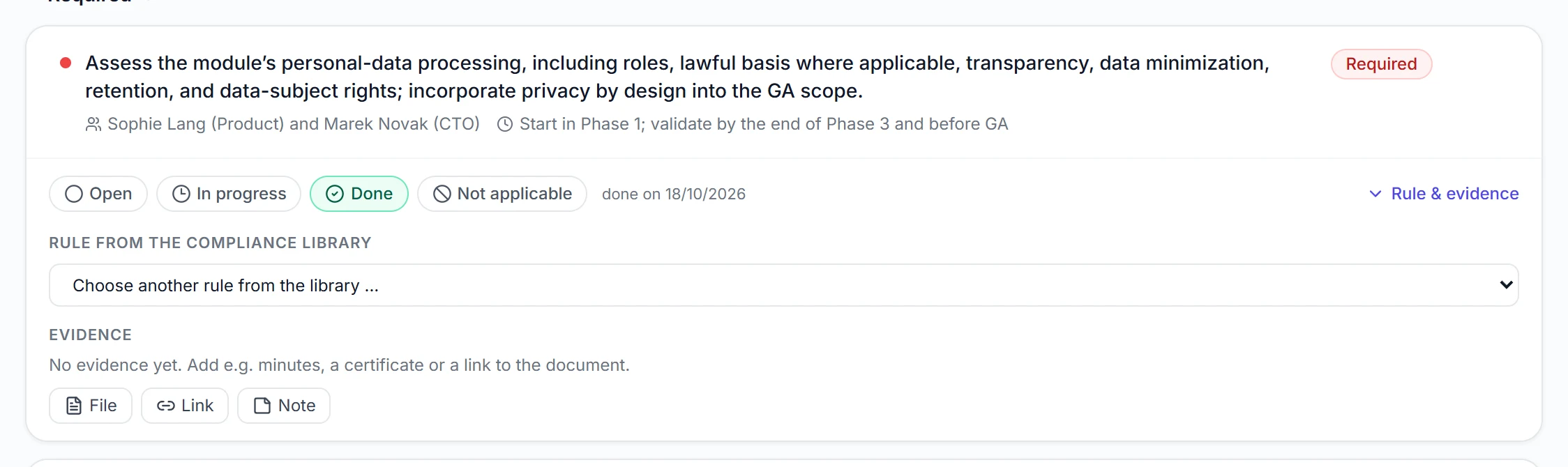
Real view from a sample Path
Best practices
These habits make the results reliable.
Always add evidence
A link to the signed contract in your DMS is worth more in an audit than a tick.
Explain “not applicable”
Have a short note added on why an obligation does not apply. It saves questions later.
Monday briefing
Asking “Which required items in my Paths are open and due soon?” once a week prevents late surprises.
Re-check after changes
New country, different industry or larger scope: re-run the check, existing items stay as they are.
Example prompts to copy
Adjust the Path name, paste into Claude, ChatGPT or your agent, done.
“Which required compliance items in my Paths are still open and due in the next four weeks?”
“The DPA with the time tracking provider is signed: [link]. Set the item in the Path Time tracking to done and add the link as evidence.”
“We are now planning the office move for our Austrian site too. Re-run the compliance check in the Path Office move and show me what was added.”
What PathHub makes sure of
Your agent works under the same rules as the app.
Files stay in the app
The agent adds evidence as a link or note. You upload files directly in PathHub.
Your permissions, no more
The agent only sees the workspace you grant at sign-in and can do at most what you can. With read access it changes nothing.
Traceable
Changes show up in the Path as if made by hand and trigger the same webhooks. Every call is logged.
Frequently asked questions
Does this replace legal advice?
No. PathHub shows typical obligations with lead times and helps you keep track. Whether an obligation applies in your case is for your legal or data protection advisers.
Can the agent upload files as evidence?
It adds evidence as a link or note. You upload files in the app, they then sit on the same obligation.
Where do the obligations come from?
From the PathHub compliance library, matched to country, industry and initiative, each with lead time and rule.
More jobs for your agent
Try it with your own Path.
Sign up for free, connect PathHub in your AI assistant and get started. Already on the free plan.