
Generate plans from one sentence
Your AI agent describes the initiative to PathHub, and PathHub creates a complete Path from it: phases, tasks with owners, schedule, line-item budget, risks, stakeholders, milestones and the compliance obligations. It takes about 2 to 4 minutes in the background.
Works with Claude, ChatGPT, Claude Code, Cursor, VS Code and any MCP client with sign-in.
Path “ERP rollout” is ready: 7 phases, 36 weeks, budget and obligations included.
Example flow, simplified
How your agent works
You say in plain language what should happen. Your agent does the rest with the PathHub tools.
Describe the initiative
One to three sentences are enough: what, for how many people, by when and under which conditions.
PathHub plans
The plan is created in the background, matched to your workspace's company context.
Review and refine
The agent tells you when the Path is ready and can sharpen it with you right away.
The result in PathHub
The finished Path with phases, tasks, budget, risks and compliance, just as if you had created it in the app.
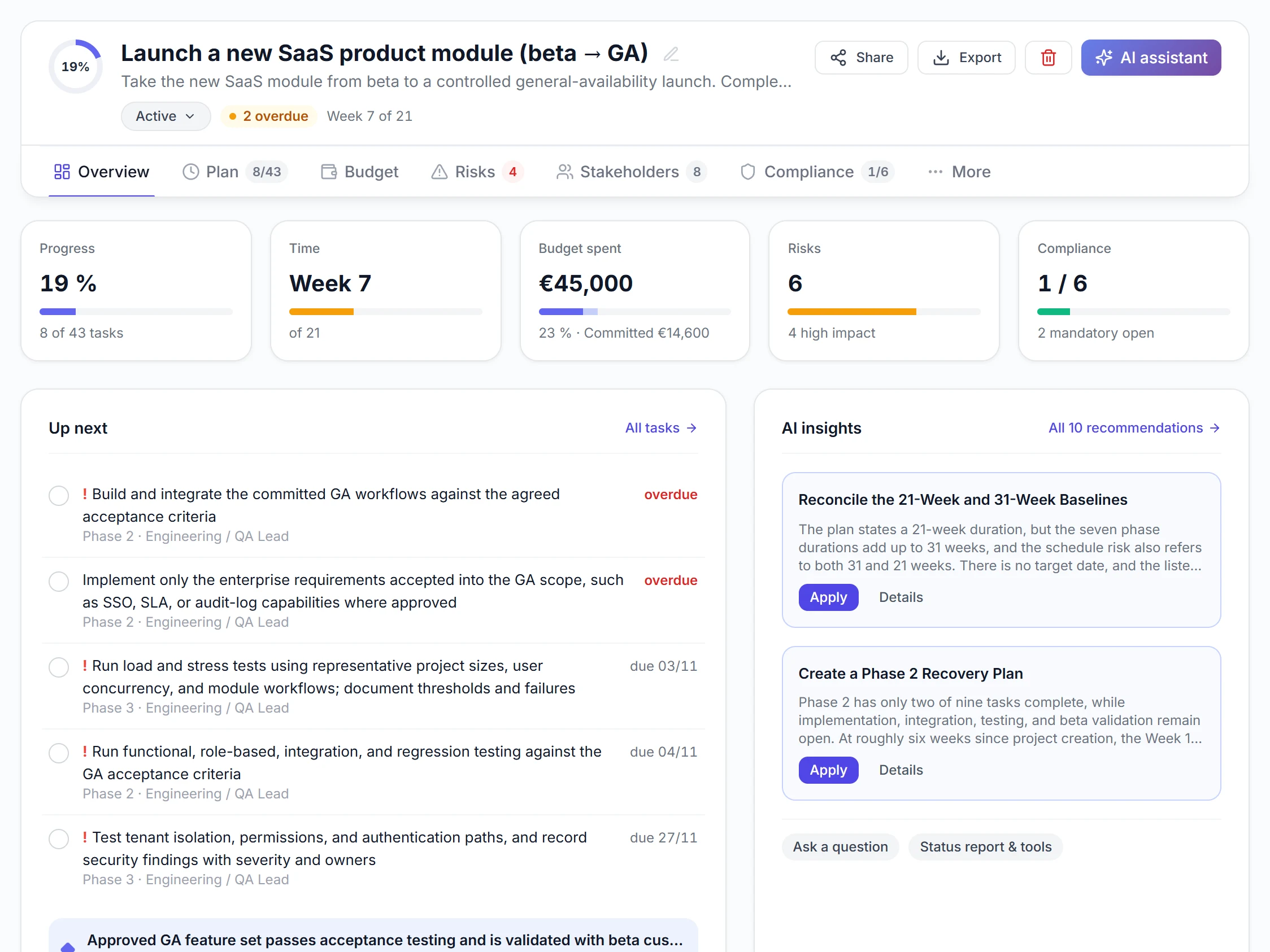
Real view from a sample Path
Best practices
These habits make the results reliable.
Be specific
Scope, number of people, target date and constraints such as a works council or several sites make the plan more precise.
Keep the company context up to date
Store departments, approval paths and industry in the workspace. Every plan builds on it.
Refine afterwards
Dates, tasks or budget can then be adjusted by the agent instead of generating everything again.
Use the project check
The built-in project check finds gaps and proposes changes. Only what you approve is applied.
Example prompts to copy
Adjust the Path name, paste into Claude, ChatGPT or your agent, done.
“Create a plan for our ERP rollout: 180 employees, two sites, works council, go-live in 9 months.”
“Create a Path for moving 60 employees to a new office, move at the end of Q2, operations without interruption. Tell me when it is ready.”
“Create a plan from this project outline and then summarise phases, total duration and budget in five sentences: [paste outline].”
What PathHub makes sure of
Your agent works under the same rules as the app.
Within your plan
Every plan generation counts towards your plan's monthly quota, just like in the app.
Your permissions, no more
The agent only sees the workspace you grant at sign-in and can do at most what you can. With read access it changes nothing.
Traceable
Changes show up in the Path as if made by hand and trigger the same webhooks. Every call is logged.
Frequently asked questions
How long does creating a plan take?
About 2 to 4 minutes. The plan is created in the background, your agent checks the status and tells you when it is ready.
How is this different from a plan written in the chat?
You do not get text but a Path your team works with: tasks with dependencies, a line-item budget, risks and obligations with lead times.
Does it count towards my quota?
Yes. Plans created by the agent count towards your plan's monthly quota just like in the app, also possible on the free plan.
More jobs for your agent
Try it with your own Path.
Sign up for free, connect PathHub in your AI assistant and get started. Already on the free plan.